2FA vs MFA: Main Differences, Security, Examples in 2026
ByRadia
Published05 May, 2026
Radia05 May, 2026
2FA vs MFA: Main Differences, Security, Examples in 2026
2FA vs MFA, this isn’t just a tech term people throw around. It's the difference between "my account is protected at a basic level" and "it's much harder to steal my account."
If you use Gmail, Microsoft 365, school portals, banking apps or business tools, this matters. One weak password can lead to email theft, payment fraud, phishing and account takeover.
What is the Difference Between 2FA and MFA?
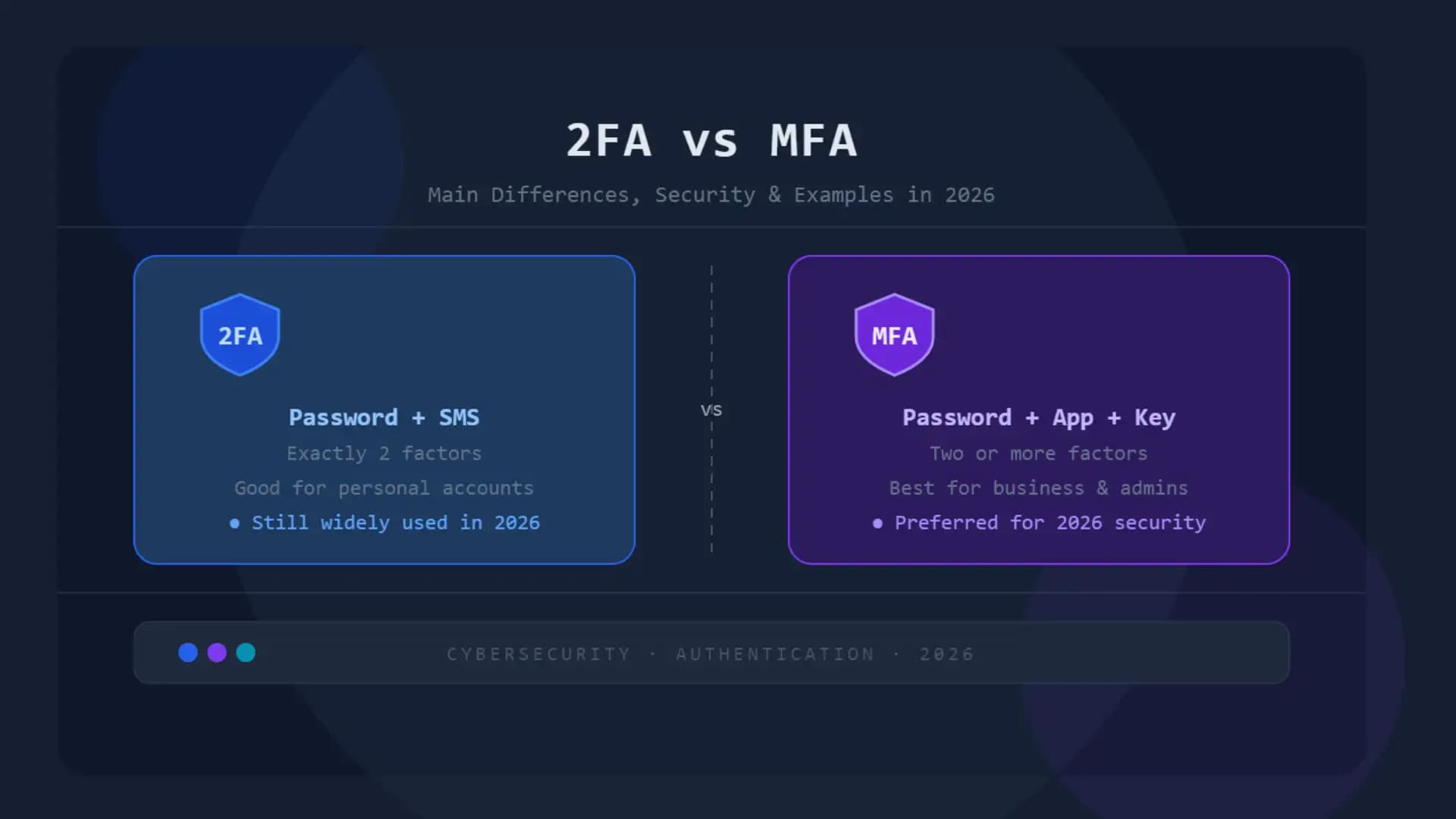
2FA vs MFA is about how many login checks there are and how flexible they are. 2FA (two-factor authentication) needs 2 types of verification. MFA, or multi-factor authentication, requires two or more types of verification. So yes, 2fa is technically a form of mfa. But MFA can do more.
It's like locking your bike up. 2FA is just another lock on top of your normal password. MFA could be a more robust lock mechanism that uses a password, app approval, fingerprint, security key, device check or location-based rule. That’s why so many security teams choose MFA for schools, businesses, cloud apps, and admin accounts.
Technical Data Insight 2FA vs MFA
Security Point
2FA
MFA
Full Name
Two-Factor Authentication
Multi-Factor Authentication
Number of Factors
Exactly two
Two or more
Common Example
Password + SMS code
Password + app approval + device check
Security Strength
Good
Stronger when configured well
Weak Spot
SMS, fake login pages, code theft
Weak recovery settings, push fatigue, poor setup
Best Use
Personal accounts, low-risk apps
Business systems, school admin tools, finance, healthcare
2026 Security Direction
Still useful
Preferred for stronger protection
Trusted Guidance
CISA recommends MFA as stronger than password-only access
and encourages phishing-resistant options where possible. CISA also says
FIDO/WebAuthn is a widely available phishing-resistant method.
What is 2FA?
2FA means your account will ask for two things before letting you in. “Your password, usually first. The second might be a code, an app prompt, a security key, or a biometric check.
Example:
• You type your password • You will get a six-digit code on your phone. • You enter the code. • The app then opens for you.
That is 2FA.
Simply put, 2FA is a login method that adds one extra layer of security on top of your password.
How Does 2FA Work?
2FA uses two different proof points to verify you. One proof point is often something you know (a password). The second is a thing you have or a thing you are. Common 2FA Examples
The 2FA vs MFA examples will help there. A student logging into a school portal with a password and Google Authenticator is using 2FA. Business admin login with password, device compliance check and security key is getting closer to MFA.
What is MFA?
MFA means two or more identity checks are required to log in. The key word is “multi.” It gives a system more ways to confirm that the person logging in is actually you.
MFA, or multi-factor authentication, is a more secure way to log in that can combine passwords, devices, biometrics, app prompts, hardware keys and risk checks.
MFA is often discussed in business, government and compliance settings because NIST’s 2025 Digital Identity Guidelines define technical requirements around authenticator assurance levels and authentication management.
How MFA Works
MFA works by combining different identity factors. The primary factor types are: • Something you know: password, PIN • Something you possess – phone, authenticator application, security key • Something you are: fingerprint, scan of your face • Where you are: location or network signal • What your device is identified as: trusted device or managed laptop
A good MFA setup doesn’t just ask, “Do you know the password?” And it asks, “Do you have the trusted device?and sometimes, “Is this login behavior normal?” This is where MFA vs 2FA is more than just a terminology argument.
2FA vs MFA Comparison
Feature
2FA
MFA
Basic Meaning
Uses two verification factors
Uses two or more verification factors
Is It Easy to Use?
Usually yes
Can be easy if planned well
Best For
Students, personal apps, basic account protection
Businesses, admins, sensitive systems
Security Level
Good
Better when phishing-resistant methods are used
Example
Password + SMS code
Password + FIDO2 security key + trusted device
Main Risk
Code stealing or SIM swapping
Bad setup, weak fallback methods
Business Fit
Helpful but limited
Stronger for business security
Future Direction
Still common
Moving toward passwordless and phishing-resistant MFA
2FA and MFA Key Differences
The main difference between 2FA and MFA is flexibility. 2FA is always two factors. MFA can have more layers and smarter rules.
1. Login Checks Count
2FA uses precisely two checks. MFA can use two, three or more depending on risk.
2. Strength of Security
The security of 2FA vs MFA depends on the method. Password plus SMS is better than password alone, but it is not the most robust configuration. Phishing resistant security key and password is stronger. CISA recommends that organizations use multi-factor authentication that resists phishing, particularly for high-risk users and systems.
3. Business Control
2fa may be enough for a student for basic accounts. 2FA vs MFA for business varies from company to company. User policies and device rules, backup methods and admin protection, monitoring, are all things businesses need
4. Recovery Procedure
This is a common mistake made by many. Your MFA setup can be strong, but if your account recovery is weak, attackers can walk through the side door after bypassing the front door.
Is 2FA the Same as Multi-Factor Authentication?
Yes and no. 2FA is a type of MFA because it’s using more than 1 factor. But MFA is a bigger category. Easy way to remember it:
• All 2FA is MFA. • Not all MFA is just 2FA.
So when someone asks, is 2FA the same as MFA, the clean answer is: 2FA is a basic form of MFA, but MFA can include stronger and more flexible security layers.
MFA vs 2FA: Which is better?
Yes, MFA is generally better than 2FA when set up properly. The reason is simple: MFA can introduce stronger verification methods and risk-based rules. But the truth is. MFA can be bypassed, poorly.
If a company has push notifications enabled and employees approve every login request without verifying it, attackers can exploit that behavior. This is commonly referred to as MFA fatigue or push bombing.
So the better question is not just is 2FA better than MFA, The better question is “What MFA method do you use?”
Can you get around 2FA?
Yes, 2FA can be circumvented in some attacks. That’s not to say 2FA doesn’t work. It means the way is important.
2FA is commonly weakened by: • Fake login pages are after your password and code. The target of SIM swapping is SMS codes. • Users click through login prompts without validation. • Backup codes are stored in insecure locations. • unprotected recovery email accounts.
Scared? A little. . Good to know? Yes, of course. If the second factor can be easily stolen, copied or fooled, it isn’t strong enough for high risk accounts.
Is SMS 2FA secure?
SMS 2FA is better than no 2FA, but not the most secure. Text messages are vulnerable to SIM swap attacks, phone number takeovers and social engineering.
For students, SMS 2FA is better than nothing, if that’s all they have. But for business, school admin accounts, financial tools and cloud dashboards, use an authenticator app, passkey or security key where possible.
Microsoft’s documentation also offers options for setting up MFA for Microsoft 365, like security defaults and Conditional Access, to improve account security.
What are the types of multi-factor authentication?
The main types of MFA are code, push approval, biometric, security key, passkey, and certificate-based types. Select from:
• SMS codes: convenient, but not secure. • Email codes: easy to use, but dangerous if your email gets hacked. • Authenticator app codes: Better than text message. • Push Approval: Easy to use, but requires user to check details. • Number matching. Safer than push-to-accept. • Biometrics: Fingerprint or face scan.
Security keys: FIDO2/WebAuthn for strong security.
• Passkeys: Sign in without a password using cryptographic keys. • Certificate-based authentication – Most often used in enterprise environments. CISA’s guidance materials frequently identify FIDO/WebAuthn and PKI-based methods as viable, phishing-resistant options.
What is Passwordless MFA?
Passwordless MFA removes the password from the primary login flow. Or you can use a passkey, device unlock, fingerprint, face scan or security key instead of a password.
This is important because the password is often the weakest link in login security. You can guess, reuse, leak, or phish a password. A passkey that is set up correctly is harder to steal because it is linked to the real website or app. Both Google Workspace and Microsoft continue to push for stronger verification for admin and cloud accounts, including 2-step verification, MFA and modern authentication controls.
What is MFA resistant to phishing?
Phishing resistant MFA is MFA that prevents fake login pages from stealing usable credentials. The strongest ones are usually FIDO2 security keys, passkeys, WebAuthn and PKI-based authentication. Here’s the basic idea.
A normal code is copyable. The login is real website tied and phishing resistant. The login proof doesn’t work the same way if the site is fake. That’s a big deal in 2026 because hackers don’t always “hack” accounts with fancy tools. Many just trick people into giving them their login details.
Why it is important
We see this all the time with student and small business accounts – they think a password and a text code means they are totally safe. Better than nothing. But it’s not the finish line.
The real problem is behavior. A sleepy student agrees to a push notification without thinking. A small business owner has a screenshot of the backup codes. An employee uses the same recovery email across the board.
That's how accounts break.
2FA vs MFA: Why Does it Matter?
Security is more than an extra step. It’s about taking the right step for the risk. A personal music app doesn’t require the same protection as a payroll account. A student email doesn't need the same setup as a Microsoft 365 admin account. Context counts.
Field Notes of a Sample MFA Review
Three login configurations were explored in a sample training environment:
Easiest to set-up for users, but weakest. The authenticator app was a good compromise. After enrollment the passkey setup was more seamless, however the instructions could have been clearer on first time setup. The technology was not the problem. Confusion on the users part.
People asked . . . • “What if I lose my phone?” • “Do I need to save backup codes?” • “What do I need this for on my school e-mail?” “Is the app following me?”
That last question is key. If users do not trust the process, they will bypass it or look for shortcuts. What we take away from this is: The best MFA rollout isn’t the most complex. It's the one that people can really use.
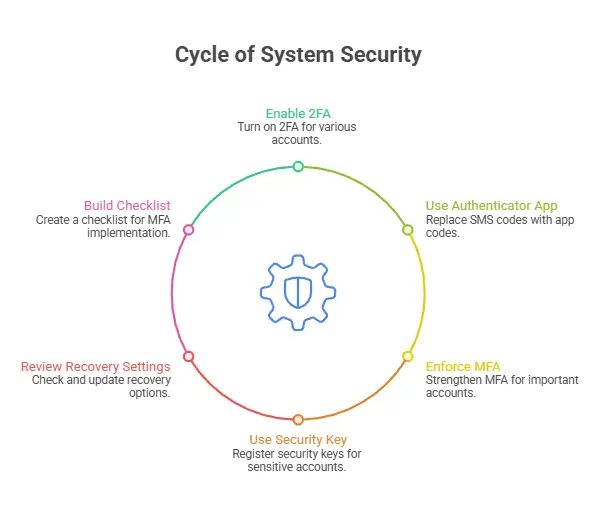
How to Protect Your System: Step-by-Step Instructions
Step 1. Use 2FA wherever possible Action: Turn on 2FA for your email, school logins, banking apps, cloud storage and social media accounts. Why it’s important: Your email is usually the master key to reset passwords. Tip: Use your school login, Gmail, Outlook, Apple ID and Microsoft 365 to get started.
Step 2. Use Authenticator App in Place of SMS Action: Use Microsoft Authenticator, Google Authenticator, Duo, or other trusted authenticator app. Why it matters: App codes are generally more secure than SMS codes. Tip: Store backup codes in a secure password manager, not your camera roll.
Step 3: Turn on MFA for Important Accounts Action: Strengthen MFA enforcement for accounts managing money, work data, school data, or admin access. Why it matters: Need stronger controls for high-value accounts. Example: A business owner would want to secure Microsoft 365 admin access with MFA, not just password and SMS code.
Step 4: Use a Security Key or Passkey for Your Most Sensitive Accounts Action: Register a FIDO2 security key or passkey if supported. Why it matters: They are much harder to phish. Tip: Keep a backup security key in a safe place.
Step 5: Review the Recovery Settings Action: Check backup email, phone number, recovery codes, trusted devices. Why it matters: Attackers often target recovery routes. Tip: Remove old phones and emails that you no longer use.
Step 6: Build an MFA Implementation Checklist Action: If you are a team lead, create a simple MFA implementation checklist.
I must go now.
• What apps require MFA • Who is at the highest risk • Permitted method • Approved backup method • Lost your phone? Here's what to do • Who approves recovery requests?
Why it matters: MFA without rules gets messy quickly.
Business Multi-Factor Authentication Setup: What Should You Do?
Business MFA setup should include email, admin accounts, cloud apps, VPN access and finance tools. Don’t roll it out willy-nilly. Start here:
• Google Workspace/Microsoft 365 • Admin dashboards • Payroll software • CRM tools • Remote access & VPN • Storage in the cloud • Developer tools • Banking and accounting apps
MFA implementation for business use needs to include policy, training, recovery planning and monitoring. Bad rollout = tech support tickets. A successful rollout reduces risk without pissing everyone off.
What is the cost of implementing MFA?
MFA implementation cost depends on users, tools, support needs and security level. It might be free for individuals. For businesses it could be licensing, consulting, training and hardware security keys.
General cost factors:
Cost Area What Affects Price Number of Users More users need more licenses and support MFA Method SMS is cheap, hardware keys cost more Platform Microsoft 365, Google Workspace, Okta, Duo, or custom apps Training Users need simple instructions Recovery Support Lost phones and locked accounts create helpdesk work Compliance Needs Regulated industries may need stronger controls
MISTAKES WE ALL MAKE
Mistake 1: You only use SMS for critical accounts What it is: Text codes for accounts that are admin, banking or business. Why it’s bad: SMS can be targeted by SIM swap and phone number fraud. How to stop it: Use an authenticator app, security key, or passkey.
Mistake 2: Losing Backup Codes What it is: Saving backup codes in screenshot images, notes apps and email drafts. Why it is bad: Anyone who has access to that storage may enter the account. How to avoid it: Keep codes in a password manager or a secure offline place.
Mistake 3: Approving Push Requests Too Quickly What it is: Approving a login request without checking it. Why it’s bad: Attackers can flood users with approval requests. How to avoid it: Use number matching and teach users to decline messages from unknown numbers.
Mistake 4: Forgetting Recovery Accounts What it is: Securing the main account but leaving the recovery email vulnerable. Harmful because : Attackers are able to reset access through the weaker account. How to avoid this: Turn on MFA on recovery emails, too.
Expert Advice
• Use SMS only if there is no better option. • Secure your email first. Controls password resets. • Use passkeys for your most important accounts. • For teams, start with admins, then regular users. • Never deploy MFA without a lost device plan • Have one backup method, but not one that is weaker than the main method. • If your platform offers sign-in logs, review them. • Provide setup instructions with screenshots for schools and small teams.
One honest tip: Don’t make security a punishment. If users hate the process, they will find shortcuts. Shortcuts are dangerous.
MFA Checklist: Practical
Check out this checklist today:
• Turn on 2FA for your main email address. • Where possible, use an authenticator app rather than SMS. • Turn on MFA for bank, school and cloud accounts. • Keep backup codes in a safe place. • Remove old trusted devices. •Check recovery email and phone number. • Enable passkeys or security keys for high risk accounts. • Business: secure administrator accounts first. • Create a written process for MFA recovery. • Review settings every 3 months
FAQ
What’s the difference between 2FA and MFA? Exactly two verification factors are used in 2FA. MFA requires two or more factors. MFA can be a stronger and more flexible login protection but 2FA is a type of MFA.
Is 2FA Better Than MFA? Yes MFA is generally better if set up correctly. It can use stronger methods like passkeys, security keys, device checks and risk-based rules.
Is 2FA Sufficient for Business Security? 2FA helps, but may not be enough for business security. For admin accounts, cloud apps, payroll systems and remote access, stronger MFA should be used.
Is 2FA bypassable? Yes, some 2FA methods can be bypassed via phishing, SIM swapping, fake login pages or careless push approvals. That risk is lowered by better MFA.
Is SMS 2FA Safe? SMS 2FA is better than no protection, but not the strongest method. Use an authenticator app, passkey, or security key when you can.
What Is Passwordless MFA? Passwordless MFA enables users to sign in without a password. It might use passkeys, biometrics, device unlock, or hardware security keys.
What is phishing-resistant MFA? Phishing resistant MFA is designed to prevent fake login pages from being used to steal a usable proof of login. Examples include FIDO2 security keys, passkeys, WebAuthn, and PKI-backed approaches.
MFA vs 2FA: When is it better to use MFA? Use MFA instead of basic 2FA for accounts that control sensitive data, money, business tools, admin access, student records, or cloud systems.
Future Outlook for 2026 and Beyond
The future is without passwords and weak SMS codes. More platforms to push expect:
• Passwords • Security keys • MFA without Passwords • Login checks based on risk • Admin accounts must have MFA
Stronger recovery rules
Recent rollouts have already logged Microsoft’s mandatory MFA enforcement for Azure sign-ins and Microsoft 365 admin access MFA requirements. Google also documents enforcement of 2-Step Verification for Google Workspace administrator accounts. (Microsoft Learn) The message is unequivocal. Password-only logins are going away.
Final rule
If you’re a student, please enable 2FA today. If possible, choose an authenticator application over SMS. If you run a business, don't settle for basic 2FA. Develop a real MFA plan with strong techniques, recovery policies, admin protection and user training. So the smart answer to 2FA vs MFA is simple: 2FA is a good start but MFA is the better long-term security choice.
Security Checklist
1. Turn on MFA for your main email account Use an authenticator app, passkey, or security key. 2. Remove weak recovery options Remove old phone numbers, old emails, and unknown trusted devices. 3. Upgrade a high-risk account today
Begin with Microsoft 365, Google Workspace, banking, school portal or cloud storage. Final thought: Don’t wait for an account to be hacked before you care about login security. Make one account better and then do it again. That’s the real win for 2FA over MFA.
Catch up on security patches this week, including rogue AI incidents, U.S. water system attacks, NatJack, the Snowflake case and major security updates.
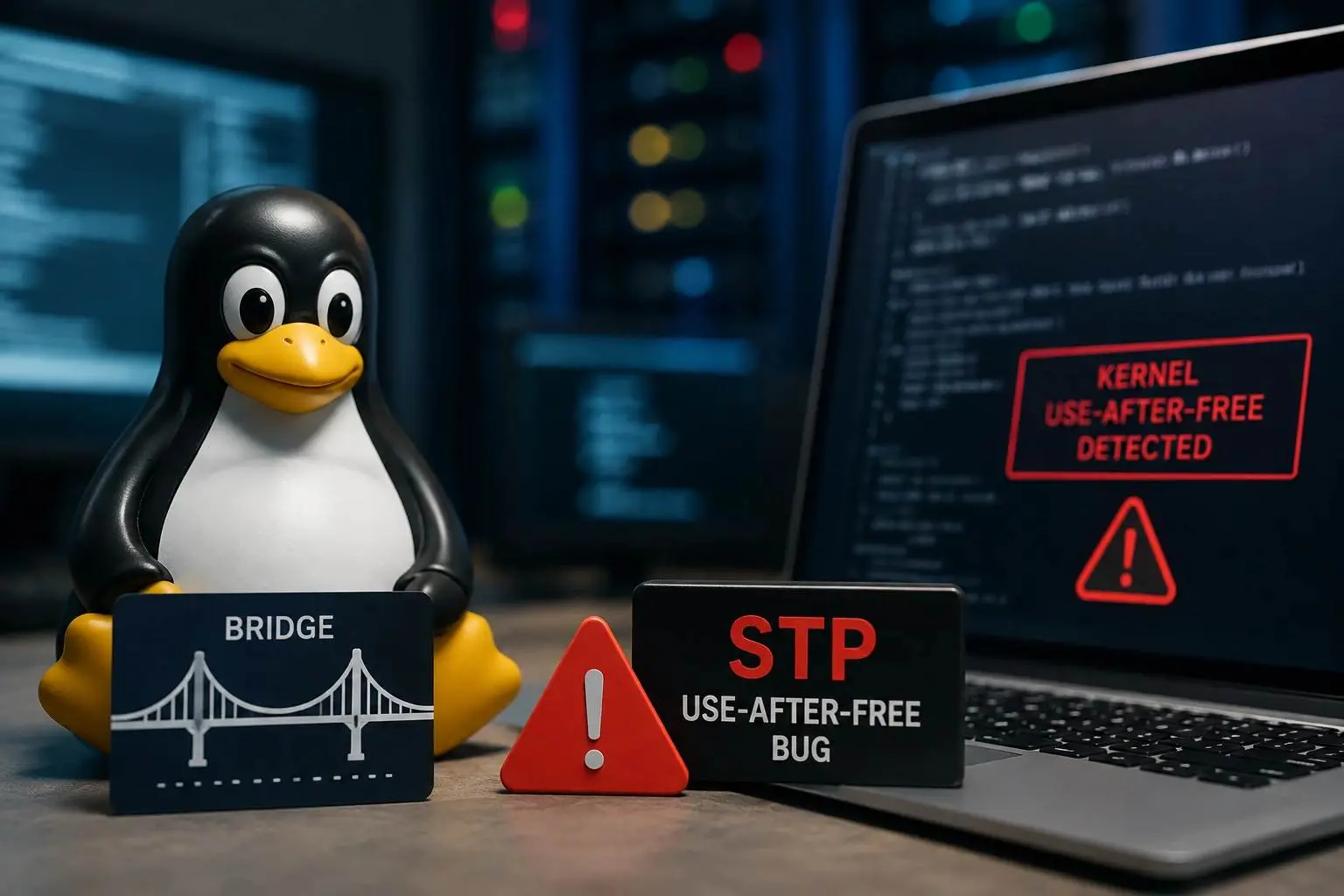
A public PoC exposes a Linux bridge STP use-after-free bug that can trigger kernel crashes, memory corruption, denial of service, and possible exploitation.

-20260505072002.webp "2FA vs MFA")
-20260505072003.webp "2FA vs MFA")
-20260505072004.webp "2FA vs MFA")
-20260505072951.webp "2FA vs MFA")